SharePoint in Regulated Industries — What Changed in 2026
SharePoint Online, SharePoint Premium, SharePoint Embedded, and SharePoint Server Subscription Edition all sit at the center of enterprise compliance programs in 2026. Every HIPAA-covered hospital, every SOC 2 Type II attested SaaS vendor, every FedRAMP-authorized federal agency, every GLBA-regulated bank, and every ITAR-compliant defense contractor has SharePoint in scope for at least one framework.
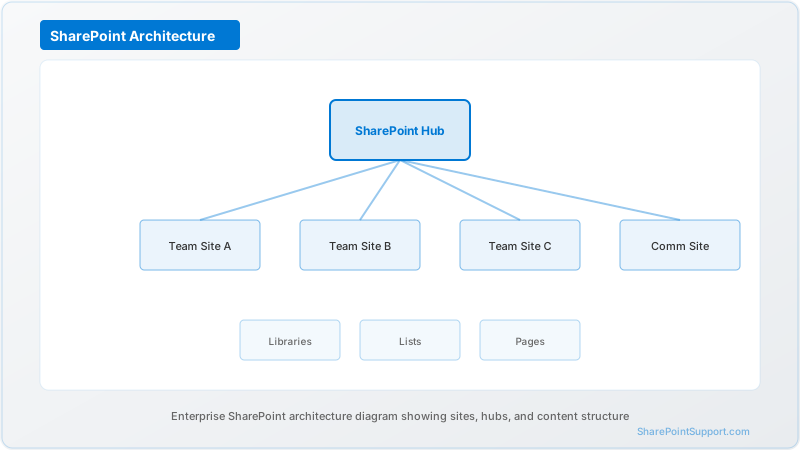
This pillar gives you the complete 2026 control matrix, the tenant decision tree, the sensitivity label taxonomy, the DLP posture, and the five-phase rollout that stands up to HIPAA, SOC 2 Type II, FedRAMP, GLBA, ITAR, and the emerging state AI and privacy laws. It is the master index for three supporting briefs covering the healthcare, financial services, and government verticals in depth.
Compliance in SharePoint is 20 percent platform and 80 percent configuration. Microsoft operates SharePoint Online, OneDrive for Business, and Teams under SOC 1, SOC 2 Type II, ISO 27001, ISO 27018, HIPAA (via BAA), FedRAMP Moderate (commercial) and FedRAMP High (GCC High), PCI DSS, and the EU AI Act transparency obligations. What your auditor tests is what you configured on top: tenant settings, permissions, sharing policies, sensitivity labels, DLP, audit retention, Copilot posture, and change management.
The 2026 Compliance Landscape
Three shifts in the regulatory environment change how SharePoint deployments must be designed in 2026:
AI-specific controls. The EU AI Act, the NIST AI Risk Management Framework, and several state AI laws now apply to SharePoint Copilot, SharePoint Premium AI services, and SharePoint Agents. Logging AI interactions, labeling AI-processed content, and restricting AI reach to classified sites are new auditable controls that did not exist in 2022.
Data sovereignty enforcement. EU regulators, the UK ICO, Canada's OPC, Australia's OAIC, and India's DPDP authority now actively audit for cross-border flows. SharePoint tenant home region, Microsoft 365 data residency commitments, and the EU Data Boundary are binding constraints rather than tuning decisions.
Continuous-audit expectations. SOC 2 Type II, ISO 27001:2022, PCI DSS 4.0, and the NYDFS 500 amendment all lean toward continuous monitoring. SharePoint activity logs must feed SIEM and alerts in real time, not in annual snapshots.
The net effect: a SharePoint compliance program that worked in 2022 — tenant setup plus occasional permission audits plus periodic screenshots — is no longer sufficient. The 2026 bar is a documented control matrix, automated evidence, and an incident-response pipeline that treats SharePoint activity as a first-class signal.
The SharePoint Compliance Control Matrix
The matrix below maps common regulatory controls to the specific SharePoint, Purview, or adjacent Microsoft feature that satisfies them. Every row should produce an evidence artifact in an audit.
| Control Area | HIPAA | SOC 2 | FedRAMP Moderate | GLBA / SOX | ITAR | SharePoint / Microsoft 365 Control |
|---|---|---|---|---|---|---|
| Access authorization | 164.308(a)(4) | CC6.1 | AC-2, AC-3 | GLBA Safeguards | 120.17 | Entra ID groups, site/library permissions, Conditional Access |
| Data classification | 164.308(a)(1) | CC3.2 | RA-2 | GLBA Safeguards | 120.17 | Purview sensitivity labels on sites and files |
| Data loss prevention | 164.308(a)(5) | CC6.6 | SI-4 | GLBA 501(b) | 120.17 | Purview DLP for SharePoint + OneDrive |
| Encryption at rest | 164.312(a)(2)(iv) | CC6.7 | SC-28 | SOX ITGC | 126.1 | AES-256 default; Customer Key via Azure Key Vault |
| Encryption in transit | 164.312(e)(2)(ii) | CC6.7 | SC-8, SC-13 | SOX ITGC | 126.1 | TLS 1.2+ |
| Audit logging | 164.312(b) | CC7.2 | AU-2, AU-3, AU-6 | GLBA / SOX 404 | 120.10 | Purview unified audit + SIEM export |
| External sharing | 164.308(a)(4) | CC6.3 | AC-20 | GLBA Safeguards | 126.1 | Tenant sharing policies, sharing-link expiration, DLP |
| Retention and disposition | 164.530(j) | CC6.5 | SI-12 | SEC 17a-4 / GLBA | 120.10 | Purview retention policies + Preservation Lock |
| Change management | 164.308(a)(8) | CC8.1 | CM-3 | SOX 404 | 120.10 | Site lifecycle governance, sensitivity label change history |
| Incident response | 164.308(a)(6) | CC7.3 | IR-4 | NYDFS 500.16 | 120.10 | Sentinel analytics on SharePoint audit logs |
| Backup and recovery | 164.308(a)(7) | A1.2 | CP-9 | SOX 404 | n/a | SharePoint recycle bin + Purview retention + backup ISVs |
| AI / Copilot governance | 164.308(a)(1) | CC9.1 | RA-5 | NYDFS 500.11 | 120.17 | Copilot tenant controls, Purview Copilot audit |
Use this matrix as the starting point for your Customer Responsibility Matrix. Every row needs a named owner, an evidence location, an automation status, and a last-tested date. Your internal version should include those columns.
Tenant Architecture: Commercial vs GCC vs GCC High vs DoD
Tenant choice is the single most consequential compliance decision in a SharePoint deployment and is effectively irreversible once regulated data is ingested.
Microsoft 365 Commercial + Azure Commercial. The default cloud. Supports HIPAA (via BAA), SOC 2 Type II, ISO 27001, ISO 27018, GDPR, UK DPA, PCI DSS, and FedRAMP Moderate for most customer data classifications. SharePoint Online, OneDrive for Business, Teams, SharePoint Premium, and SharePoint Embedded are all available. Appropriate for HIPAA, SOC 2, GLBA, and most GDPR workloads. Not appropriate for Controlled Unclassified Information (CUI), ITAR data, or FedRAMP High workloads.
Microsoft 365 GCC. US-only data residency with background-screened Microsoft personnel. Appropriate for state and local government and for federal civilian workloads that do not require FedRAMP High authorization. SharePoint availability is close to commercial; certain features lag.
Microsoft 365 GCC High. FedRAMP High authorized, DoD IL4 compliant, ITAR supportive. A separate tenant with its own identity boundary and feature-parity lag. SharePoint Online is available in GCC High, though SharePoint Premium and some Copilot features have narrower availability. The typical choice for DIB contractors and federal agencies handling sensitive-but-unclassified data.
Microsoft 365 DoD (IL5). For sensitive DoD mission data. SharePoint availability is a further subset of GCC High, with authorization lag. Typically used by DoD components and major defense primes.
EU Data Boundary. Guarantees EU-only data residency for eligible Microsoft 365 services including SharePoint Online. Verify each capability against the current Microsoft EU Data Boundary documentation.
The tenant decision must be made before any regulated data is ingested. Migration between commercial and GCC High is a multi-month, multi-million-dollar project and should be planned as a discrete program if required.
Sensitivity Labels: The Backbone of SharePoint Governance
Purview sensitivity labels are not optional for regulated SharePoint deployments. They drive encryption, DLP, retention, external sharing, and Copilot scope. Without labels, your governance is blind.
A regulated SharePoint tenant needs, at minimum, a label taxonomy with:
- Public — Content intended for external distribution.
- Internal — Default for ordinary business content.
- Confidential — Higher-risk business information (strategy, personnel, pricing).
- Highly Confidential — Regulated — Parent label with sub-labels for HIPAA-PHI, PCI, CUI, ITAR, and any industry-specific classifications.
Apply labels at both site and file level. Site-level labels enforce tenant-wide policies: external sharing restrictions, Conditional Access device compliance, and privacy (private vs public sites). File-level labels travel with the file, persisting in exports, downloads, and shared copies.
Target 70 percent+ label coverage on content in scope for Copilot or for regulated frameworks before enabling broad access. Auto-labeling policies drive coverage; manual labeling by content owners closes the gaps. Revisit the coverage metric quarterly.
Permissions and External Sharing
Permissions hygiene is the top source of SharePoint compliance incidents. The common anti-patterns include:
- Inherited permissions from parent sites with broad groups (All Employees, Everyone) that accumulate access over years
- Broken inheritance on sensitive folders with unique permissions that drift from business requirements
- Stale sharing links — "Anyone with the link" or "People in your organization" — that outlive the business need
- Nested group membership where users inherit SharePoint access through Azure AD groups they didn't know they were in
- Guest user accumulation from external sharing with no expiration or review process
The remediation pattern for a regulated SharePoint deployment:
- Audit tenant-wide using Microsoft Graph or SharePoint Admin Center reports — identify sites with "Everyone" or "Everyone except external users" permissions.
- Apply sensitivity labels with sharing restrictions to Confidential and higher sites.
- Configure tenant sharing policies to require link expiration (30 to 90 days depending on sensitivity) and prevent "Anyone with the link" sharing for regulated sites.
- Enable Conditional Access for SharePoint requiring device compliance or MFA.
- Schedule quarterly access reviews using Microsoft Entra ID access reviews.
For additional detail on governance, see our governance framework and document management best practices.
Purview Data Loss Prevention for SharePoint
Purview DLP policies scoped to SharePoint Online and OneDrive detect sensitive information types in documents and trigger actions: show a policy tip, block access, block sharing, or notify compliance. Baseline DLP coverage for a regulated tenant includes:
- HIPAA identifiers (SSN, MRN, DEA number, patient address plus name, dates) for healthcare
- PCI (primary account number, track data) for merchants and financial services
- Financial account numbers, routing numbers, SWIFT codes for banks
- CUI markings and ITAR indicators for DIB contractors
- Custom sensitive info types for industry-specific identifiers
Tune DLP in Monitor mode before enforcing. Start with high-confidence matches only, observe the false-positive rate for 2 to 4 weeks, then enable enforcement actions. Most programs begin with "warn the user" policies and escalate to blocking only for the highest-classification data.
Audit Logging and Evidence
Regulated SharePoint programs do three things with audit logs: retain them long enough to satisfy the framework, export them to a SIEM for real-time detection, and automate evidence collection for annual audits.
Retention. Purview unified audit retains SharePoint events for 90 days (E3) or 180 days (E5) by default. HIPAA requires six years. SOC 2 is typically one year for the audit period plus a tail. FedRAMP requires three years. The practical approach is Purview Audit (Premium) for up to ten years of native retention, or continuous export to Azure Log Analytics, Sentinel, or Splunk with a six-year retention policy.
SIEM integration. Stream SharePoint activity logs to Microsoft Sentinel through the Office 365 connector. Analytic rules should cover: mass file download, external sharing to new domains, permission escalation, first-time access to a regulated site, and bulk export events. Treat Sentinel SharePoint alerts as first-class signals in your incident response runbooks.
Automated evidence collection. Use the Microsoft Graph API to snapshot site permissions, sensitivity label coverage, sharing inventory, and DLP alert history on a scheduled cadence. Store snapshots in a governance SharePoint site or a Fabric lakehouse. Automation reduces audit preparation from weeks to days.
Copilot for SharePoint in Regulated Environments
Microsoft Copilot for SharePoint, SharePoint Agents, and SharePoint Premium AI introduce new governance surfaces. Copilot respects existing permissions but aggressively surfaces content that users technically had access to but never browsed to — which makes permissions hygiene the single most important pre-Copilot control.
The pre-Copilot checklist for regulated SharePoint:
- Complete oversharing remediation at the site, library, and sharing-link level.
- Reach 70 percent+ sensitivity label coverage on content in Copilot scope.
- Configure Purview DLP policies specifically scoped to Copilot.
- Enable Purview Copilot audit with retention matching the longest framework (six years for HIPAA).
- Define safe and unsafe Copilot use cases in a written policy.
- Train Copilot-licensed users and require attestation before licensing.
Deferring any of these steps produces audit findings. HIPAA environments in particular should not enable Copilot for SharePoint without completing all six.
Records Retention and Disposition
Records retention in SharePoint has tightened considerably in 2026. Regulated frameworks expect explicit, policy-driven retention — not ad-hoc site cleanup. Use Microsoft Purview retention labels published through the Records Management workload. A defensible taxonomy for a regulated SharePoint tenant includes:
- Record label (WORM) for content that must be retained as an unalterable record for a defined period; Preservation Lock enforces immutability
- Regulatory record label for content subject to regulator-defined retention (SEC 17a-4, ITAR, HIPAA)
- Retain-only label for content with a retention period but not immutability requirement
- Retain-and-delete label for content that must be disposed of at end of retention
- Delete-only label for low-value content with a scheduled disposition
Preservation Lock is irreversible once applied. Plan the taxonomy carefully before publishing policies to production tenants. Most firms begin with a pilot tenant or a sandbox site collection.
Backup, Restore, and Cyber Resilience
SharePoint Online has native recycle bin protection (93-day retention across first-stage and second-stage bins) and Purview retention policies, but these are not backup in the traditional sense. For regulated environments, most programs supplement with a dedicated Microsoft 365 backup ISV (AvePoint, Veeam, Metallic, Acronis, etc.) that captures immutable snapshots at defined intervals.
Backup serves two compliance purposes: (1) ransomware resilience — the ability to restore a known-good state even if a malicious actor tampers with the live tenant, and (2) retention durability — the ability to produce content after the native retention period has elapsed. HIPAA, SOC 2, FedRAMP, and NYDFS 500 all implicitly or explicitly expect both capabilities.
Document backup RPO and RTO in the SharePoint governance policy. Test restores quarterly for the highest-classification data. Restore testing is frequently cited as evidence in SOC 2 Type II A1 (Availability) testing.
External Sharing Posture
External sharing is the highest-volume source of compliance incidents in SharePoint. Default settings in commercial Microsoft 365 are generous and must be tuned for regulated environments. The recommended posture:
- Block "Anyone with the link" tenant-wide for any site labeled Confidential or higher
- Require authentication for all external sharing (block anonymous access)
- Apply link expiration policies: 30 days for Highly Confidential — Regulated, 90 days for Confidential, 180 days for Internal
- Restrict external sharing to a managed domain allowlist where the regulatory posture permits
- Require Conditional Access policies for guest users accessing SharePoint
- Enable Microsoft Defender for Cloud Apps policies for SharePoint to alert on anomalous external sharing
- Review guest user inventory quarterly using Entra ID access reviews
Document the external sharing policy and train site owners. Most oversharing incidents trace back to a site owner who enabled "Anyone" sharing for convenience without understanding the compliance implication.
Compliance Decision Framework
Use this five-question framework at the start of every regulated SharePoint deployment:
- What is the highest data classification in scope? The highest classification dictates the tenant, label taxonomy, and full control set.
- Which frameworks apply, and which is the binding one? Most enterprises face multiple frameworks; design to the strictest.
- Where will audit log evidence live, and for how long? If you cannot answer in one sentence, build the logging pipeline before ingesting regulated data.
- Who is accountable for each control? Every matrix row needs a named owner. Shared ownership is no ownership.
- What is our Copilot posture by department? Enabled, disabled, or partial — document before licensing.
For industry-specific playbooks, see the three supporting briefs:
- SharePoint for healthcare: HIPAA PHI lifecycle
- SharePoint for financial services: GLBA and recordkeeping
- SharePoint for government: ITAR and FedRAMP controls
Related depth on governance operations is available in our governance framework guide, document management best practices, security hardening guide, and migration best practices content.
SharePoint Server Subscription Edition in Regulated Environments
For organizations with regulated workloads that cannot move to the cloud — classified workloads, data sovereignty constraints preventing cloud deployment, or specific on-premises compliance obligations — SharePoint Server Subscription Edition (SharePoint SE) is the only remaining supported on-premises SharePoint option after July 14, 2026 when SharePoint 2016 and 2019 reach end of support.
SharePoint SE compliance posture differs from SharePoint Online:
- Inherited controls are fewer. You operate the infrastructure, so FedRAMP, SOC 2, and similar inheritances from Microsoft do not apply.
- Customer operates everything. OS patching, SQL Server security, IIS hardening, backup, monitoring — all on the customer side.
- Customer-managed encryption. Transparent Data Encryption (TDE), Always Encrypted, and disk-level encryption are configured and operated by the customer.
- Integration with Purview is limited. Some Purview capabilities (sensitivity labels with protection) require SharePoint Online; on-premises has narrower label support.
For most regulated workloads, SharePoint Online with tenant-appropriate cloud is the lower-risk path. SharePoint SE on-prem is appropriate only when a specific regulatory or sovereignty requirement prevents cloud deployment, and the compliance burden must be budgeted accordingly.
Common Audit Findings and How to Prevent Them
The seven most common audit findings for SharePoint in regulated environments and their prevention:
- Default 90-day audit retention for HIPAA — Enable Purview Audit (Premium) or Sentinel export with six-year retention before the audit period begins.
- Sites without sensitivity labels — Publish the taxonomy and apply default site labels before onboarding regulated content. Target 70 percent+ coverage.
- "Everyone" permissions on sensitive sites — Run Graph audits quarterly and remediate. Site-level labels should block "Anyone" sharing for Confidential or higher.
- Indefinite guest sharing links — Enforce link expiration (30–90 days) at the tenant level. Expired links do not persist.
- Unmonitored Copilot use — Enable Purview Copilot audit with six-year retention and build Sentinel analytic rules before enabling Copilot for regulated users.
- No access reviews — Schedule Entra ID access reviews quarterly for site owners and highly-privileged roles.
- Orphaned workspaces after staff departure — Implement Microsoft 365 Groups lifecycle policies and site ownership transfer automation triggered by HR offboarding.
Each of these findings is preventable in advance. The cost of prevention is measured in configuration hours; the cost of remediation during an audit is measured in consultant-days and audit-findings reports.
Frequently Asked Questions
Is SharePoint Online HIPAA compliant out of the box?
No software is HIPAA compliant by default. SharePoint Online becomes HIPAA eligible when deployed inside a Microsoft 365 tenant covered by an active Business Associate Agreement (BAA) with Microsoft, and when tenant-level controls — permissions hygiene, sensitivity labels, DLP, Purview audit retention — meet the HIPAA Security Rule. The platform is eligible; the deployment is what the OCR evaluates.
Does Microsoft sign a BAA for SharePoint Online?
Yes. Microsoft offers a BAA under the Microsoft Online Services Terms that explicitly covers SharePoint Online, OneDrive for Business, and Microsoft Teams. Confirm the BAA references the current Microsoft Product Terms version before go-live and that SharePoint Online remains on the HIPAA-eligible services list.
Can SharePoint sites be in scope for SOC 2 Type II?
SharePoint itself is not audited under your SOC 2 report — Microsoft operates SharePoint under its own SOC 1 and SOC 2 Type II attestations available from the Microsoft Service Trust Portal. Your SOC 2 audit evaluates the customer-configurable controls on top.
Do I need SharePoint in GCC High for FedRAMP High or ITAR?
Yes. FedRAMP High, DoD Impact Level 4/5, and ITAR data require GCC High or Azure Government tenants. Commercial SharePoint Online carries FedRAMP Moderate authorization and is not approved for CUI, ITAR, or FedRAMP High workloads.
How long must SharePoint audit logs be retained for HIPAA?
Six years minimum from event date. Purview Audit Premium supports up to ten years of native retention; alternatively export continuously to Sentinel, Log Analytics, or Splunk with six-year retention.
What encryption does SharePoint Online use?
AES-256 at rest (per-file keys under a customer-level master key) and TLS 1.2+ in transit. Customer Key via Azure Key Vault is available for regulated environments requiring customer control of the master key.
How do sensitivity labels affect SharePoint compliance?
Labels drive encryption, DLP, retention, external sharing, and Copilot scope. Publish a taxonomy (Public, Internal, Confidential, Highly Confidential — Regulated with PHI/PCI/CUI/ITAR sub-labels) and target 70 percent+ coverage on regulated content before enabling Copilot.
How do I prevent oversharing in regulated sites?
Site-level sensitivity labels with sharing restrictions, link expiration policies, Conditional Access requiring device compliance, Purview DLP, and quarterly access reviews.
Can Microsoft Copilot for SharePoint be used in HIPAA environments?
Yes, in the commercial BAA-covered cloud, provided oversharing is remediated, label coverage is above 70 percent, Purview Copilot audit is enabled with six-year retention, and clinicians are trained on prompt hygiene.
What is the fastest path to a compliant SharePoint deployment?
Five phases over 10–16 weeks: governance baseline, platform hardening, content classification, monitoring, and operational cadence.
How do I evidence SharePoint controls to external auditors?
BAA letter, tenant settings export, Graph-derived permission exports, sharing inventory, sensitivity label and DLP policies, Purview audit samples, Copilot settings, Conditional Access policies, and Microsoft SOC 2 / FedRAMP attestations.
What are the most common compliance pitfalls?
Enabling Copilot before remediating oversharing; default 90-day audit retention for HIPAA; no sensitivity labels on sites; single tenant mixing regulated and non-regulated data; indefinite guest sharing links.
Does SharePoint Embedded require its own compliance posture?
SharePoint Embedded inherits the underlying Microsoft 365 authorization boundary and BAA, with additional governance for container-level permissions, Azure AD app registrations, and audit subscriptions. Treat each Embedded container as a distinct audit scope.
How does SharePoint Premium change the compliance picture?
Premium layers AI content services on top of SharePoint Online. The BAA and authorization boundary apply. Validate that each Premium AI feature is BAA-covered, apply labels to models, log Premium audit alongside standard SharePoint audit.
What changes for state and local government SharePoint deployments?
Deploy in commercial (if residency and background checks allow) or GCC (US-only residency, background-screened personnel). GCC High is reserved for CUI and FedRAMP High. CJIS data requires a separate assessment. State privacy laws apply to resident personal data in SharePoint.
Written by the SharePoint Support Team
Senior SharePoint Consultants | 25+ Years Microsoft Ecosystem Experience
Our senior SharePoint consultants bring deep expertise spanning 500+ enterprise migrations and compliance implementations across HIPAA, SOC 2, and FedRAMP environments. We cover SharePoint Online, Microsoft 365, migrations, Copilot readiness, and large-scale governance.
Expert SharePoint Services
Frequently Asked Questions
Is SharePoint Online HIPAA compliant out of the box?▼
Does Microsoft sign a BAA for SharePoint Online?▼
Can SharePoint sites be in scope for SOC 2 Type II?▼
Do I need SharePoint in GCC High for FedRAMP High or ITAR?▼
How long must SharePoint audit logs be retained for HIPAA?▼
What encryption does SharePoint Online use for regulated data?▼
How do sensitivity labels flow into SharePoint compliance?▼
How do I prevent oversharing in regulated SharePoint sites?▼
Can Microsoft Copilot for SharePoint be used in HIPAA environments?▼
What is the fastest path to a compliant SharePoint deployment?▼
How do I evidence SharePoint controls to external auditors?▼
What are the most common SharePoint compliance pitfalls?▼
Does SharePoint Embedded require its own compliance posture?▼
How does SharePoint Premium change the compliance picture?▼
What changes for state and local government SharePoint deployments?▼
Need Expert Help?
Our SharePoint consultants are ready to help you implement these strategies in your organization.
Continue Reading in Compliance
Retention Labels in SharePoint: Compliance Made Easy
Implement retention labels to automate records management, meet compliance requirements, and manage content lifecycle in SharePoint.
ComplianceSharePoint Accessibility: WCAG Compliance Guide
Ensure your SharePoint sites are accessible to all users with this comprehensive WCAG compliance guide covering design principles, testing tools, and remediation strategies.
ComplianceSharePoint HIPAA Compliance Guide: Configuring Microsoft...
Complete guide to making SharePoint Online HIPAA compliant. Covers Business Associate Agreements, PHI controls, encryption, audit logging, access management, and Microsoft Purview configuration for healthcare organizations.
ComplianceSharePoint SOC 2 Compliance Guide: Configuring Microsoft...
Complete guide to SOC 2 Type II compliance for SharePoint Online in financial services. Covers access controls, encryption, audit logging, change management, availability, and Microsoft Purview configuration for SOC 2 audit readiness.
ComplianceSharePoint Retention Policies & Purview Guide
How to configure Microsoft Purview retention policies for SharePoint Online, including auto-apply labels, adaptive scopes, disposition reviews, and compliance strategies for regulated industries.
ComplianceSharePoint Compliance: HIPAA, SOX & FedRAMP Guide
Configure SharePoint Online for HIPAA, SOX, and FedRAMP compliance with DLP policies, audit trails, retention, encryption, and access controls.