Most SharePoint migration estimates fall apart the moment someone asks how the number was built. Vendors quote a per-GB rate, add a "professional services" line, and hope nobody notices the missing 30 percent. This guide is the model our team actually uses when we price migrations for finance, healthcare, manufacturing, and professional services clients — five tiers, seven line items, a full worked example, and the twelve inputs required to produce a defensible number.
The five enterprise migration tiers
There is no single "SharePoint migration cost." Pricing is bimodal by content complexity and workload heterogeneity, and it clusters into five tiers we see over and over.
Tier 1: SMB migration ($15K–$40K)
Under 500 users, less than 500 GB of content, one or two file shares plus a single SharePoint on-premises farm or a Google Drive tenant. No custom workflows, no InfoPath forms, minimal permissions complexity. Timeline: 4 to 8 weeks.
Tier 2: Mid-market migration ($40K–$120K)
500 to 2,500 users, 500 GB to 3 TB of content, multiple file shares, one SharePoint 2013 or 2016 farm, some legacy list workflows, moderate metadata reuse. Usually includes a small SharePoint Server 2019 or SharePoint Server Subscription Edition remnant. Timeline: 8 to 14 weeks.
Tier 3: Enterprise migration ($120K–$450K)
2,500 to 15,000 users, 3 TB to 15 TB, mixed sources (file shares, SharePoint on-premises, Google Workspace, Box, Dropbox), 50 to 300 sites, InfoPath forms to rebuild in Power Apps, SharePoint Designer workflows to convert to Power Automate, custom master pages, and multi-region tenant considerations. Timeline: 4 to 8 months.
Tier 4: Complex enterprise migration ($450K–$1.2M)
15,000 to 50,000 users, 15 TB to 60 TB, four or more source platforms, hundreds of custom workflows, records management with retention labels, e-discovery holds mid-migration, tenant-to-tenant scenarios post-M&A, and a hybrid coexistence period. Timeline: 8 to 14 months.
Tier 5: Mega migration ($1.2M+)
50,000+ users, 60 TB+, multi-tenant consolidation, regulated workloads (HIPAA, FedRAMP-adjacent, ITAR, SOX), an active mergers-and-acquisitions pipeline, SharePoint Framework solutions to rewrite, and a multi-year hypercare tail. Timeline: 12 to 24 months.
The seven line items in every real estimate
If an estimate only shows two or three numbers, something is buried. The seven line items below account for 95 percent of what actually gets billed.
1. Discovery and assessment (5–10% of total)
Tenant inventory, source-system content scans, permissions mapping, workflow inventory, custom-solution catalog, network baseline. A defensible discovery includes both an automated scan and structured interviews with each business unit. For a Tier 3 engagement this typically runs $12K to $40K.
2. Target tenant setup and governance (3–7%)
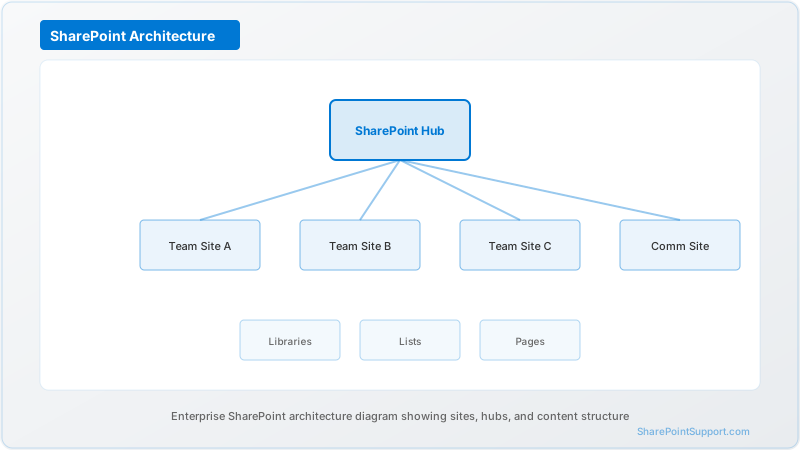
Site collection design, hub site architecture, information architecture, sensitivity labels, retention labels, DLP baseline, guest sharing posture, external access controls. See our SharePoint consulting service for the scope pattern we use here.
3. Migration tool licensing (5–15%)
This is the single most misquoted line. Per-GB pricing at commercial list is roughly:
| Tool | List per-GB | Enterprise volume discount |
|------|-------------|----------------------------|
| ShareGate | $0.05–$0.10 | 15–30% at 5 TB+ |
| Metalogix Content Matrix | $0.06–$0.12 | 20–35% at 10 TB+ |
| AvePoint FLY / Fly Server | $0.04–$0.09 | 20–40% at 10 TB+ |
| Quest On Demand Migration | $0.05–$0.11 | 15–30% at 5 TB+ |
| SharePoint Migration Tool (SPMT) | $0 | Microsoft-supplied |
The SharePoint Migration Tool is free but does not cover Google Drive, Box, Dropbox, Notes/Domino, or on-premises with heavy metadata reshaping. A Tier 3 migration typically pays $20K to $60K for a mixed licensing model.
4. Content migration labor (35–50%)
The single biggest cost. This is the actual moving of content, permissions reshaping, metadata mapping, delta syncs, and cutover coordination. Labor rates for senior migration consultants run $175 to $275 per hour in the US market. For 10 TB across 250 sites with moderate complexity, budget 700 to 1,400 labor hours.
5. Custom workload rebuild (10–25%)
InfoPath to Power Apps, SharePoint Designer to Power Automate, classic pages to modern, SPFx solutions to modern equivalents, custom timer jobs, and event receivers. Rebuild costs are decoupled from GB size — a 200 GB site with 80 custom workflows costs more than a 5 TB site with none.
6. Training and change enablement (5–10%)
Role-based training tracks, super-user programs, help-desk playbooks, and adoption dashboards. For 5,000 users at a mid-enterprise engagement, budget $20K to $50K.
7. Hypercare and stabilization (5–15%)
The 30 to 90 days after cutover where the migration team stays engaged for defect triage, permissions escalations, orphaned content cleanup, and Copilot/search index tuning. Under-scoping this is the single most common cause of budget overruns.
Worked example: 10 TB, 5,000 users, 250 sites
Let's price a real scenario end-to-end.
Client profile: Regional healthcare system. 5,000 users across 12 locations. 10 TB in SharePoint Server 2019, plus 2 TB on a legacy file share. 250 site collections, 40 InfoPath forms, 60 SharePoint Designer workflows, 15 custom SPFx web parts, HIPAA compliance requirements.
| Line item | Cost | Notes |
|-----------|------|-------|
| Discovery and assessment | $28,000 | 6 weeks, 2 consultants, includes HIPAA compliance mapping |
| Target tenant setup | $22,000 | Hub site design, labels, DLP, guest posture |
| Tool licensing | $48,000 | ShareGate at 30% volume discount, 12 TB total |
| Content migration labor | $148,000 | 800 hours at $185/hr blended rate |
| Custom workload rebuild | $86,000 | 40 InfoPath + 60 workflows + SPFx rework |
| Training and enablement | $34,000 | Super-user program + role-based tracks |
| Hypercare (60 days) | $42,000 | 25 hours/week, 8 weeks |
| Subtotal | $408,000 | |
| Contingency (10%) | $40,800 | Standard for regulated workloads |
| Total | $448,800 | |
This lands at the top of Tier 3 or the bottom of Tier 4 depending on how you count contingency. The per-GB math comes out to about $37 per GB, which is roughly the enterprise midpoint for healthcare workloads in 2026.
The 12 inputs a credible calculator needs
If you're building an internal cost model or evaluating vendor quotes, the twelve inputs below drive 90 percent of the number.
Content inputs
- Total content volume (TB) — the raw number
- Source platforms and counts — SharePoint on-premises, file shares, Google Workspace, Box, Dropbox, Notes, each counted separately
- Site or library count — proxy for permissions and metadata complexity
- Average file size — a 10 TB source with 40 million small files costs more than 10 TB with 2 million larger files
- Files over 100 GB — these need special handling and can bottleneck throughput
Complexity inputs
- Custom workflow count — InfoPath, SharePoint Designer, third-party BPM
- Custom code count — SPFx solutions, farm solutions, event receivers, timer jobs
- Permissions depth — average nesting levels and unique permission count
- Metadata reuse target — are you keeping the source taxonomy or redesigning?
Business inputs
- User count and geographic distribution — drives training and change costs
- Regulatory profile — HIPAA, SOX, ITAR, FedRAMP-adjacent, or none
- Cutover risk tolerance — big-bang vs phased vs coexistence, each has a very different cost curve
When a per-GB quote is a red flag
If a vendor gives you a per-GB number without asking about custom workloads, regulatory profile, or source platform mix, they are either underestimating and will change-order later, or they've built in enough padding to cover the worst case. Neither serves you.
A defensible estimate names the assumptions. Ours always include: source system inventory, complexity multipliers, contingency percentage, and the scope boundary for hypercare. If any of those are missing from a quote you're evaluating, that's where the surprises will come from.
How to reduce migration cost without cutting corners
- Trim before you migrate. Purge content older than the retention requirement. A 30 percent volume reduction on a 15 TB source saves roughly $60K in labor and licensing at Tier 3 rates.
- Standardize before you migrate. Redesigning taxonomy in flight is 3 to 5 times more expensive than doing it before content moves.
- Consolidate sources. Every additional source platform adds roughly 15 percent to total cost due to tool licensing and connector engineering.
- Delay custom rebuilds. Rebuild InfoPath forms and SharePoint Designer workflows after cutover using Power Platform, not during — it separates migration risk from modernization risk.
- Time cutover with fiscal cycles. A cutover during Q4 close in a public company burns 30 percent more labor than the same cutover in June.
Our SharePoint migration service uses this same twelve-input model on every engagement. For urgent SharePoint Server end-of-support scenarios, our emergency support team can accelerate the timeline compression.
Frequently asked pricing questions
For the answers to the most common cost questions, see the FAQ section below.
Expert help from our SharePoint consultants
Our team has priced and delivered SharePoint migrations from 500 GB single-site scenarios up to multi-tenant M&A consolidations exceeding 100 TB. If you need a defensible cost model for your specific scenario, our SharePoint consulting team will build one against your actual source inventory. Reach out through our contact page to start a conversation.
Written by the SharePoint Support Team
Senior SharePoint Consultants | 25+ Years Microsoft Ecosystem Experience
Our senior SharePoint consultants bring deep expertise spanning 500+ enterprise migrations and compliance implementations across HIPAA, SOC 2, and FedRAMP environments. We cover SharePoint Online, Microsoft 365, migrations, Copilot readiness, and large-scale governance.
Expert SharePoint Services
Frequently Asked Questions
Why do SharePoint migration quotes vary by 3x for the same content volume?▼
Is the free SharePoint Migration Tool (SPMT) enough for enterprise migrations?▼
What percentage of budget should go to hypercare?▼
How do we estimate labor hours for content migration?▼
Should we migrate SharePoint Server on-premises workloads before end of support?▼
Is training worth 5 to 10 percent of migration budget?▼
How do we handle regulated content during migration?▼
Need Expert Help?
Our SharePoint consultants are ready to help you implement these strategies in your organization.
Continue Reading in Migration
SharePoint Migration Best Practices: 15 Expert...
Learn the proven migration strategies used by leading organizations to migrate to SharePoint Online without disruption.
MigrationTenant-to-Tenant Migration: Complete Planning Guide for M&A
Master the complexities of SharePoint tenant-to-tenant migrations during mergers, acquisitions, and divestitures with our comprehensive planning guide.
MigrationWorkflow Migration: SharePoint 2013 to Power Automate
Navigate the transition from legacy SharePoint 2013 workflows to Power Automate with this comprehensive migration guide covering assessment, planning, and implementation strategies.
MigrationMigrating from Google Workspace to SharePoint
Step-by-step guide for migrating from Google Drive, Docs, and Sites to SharePoint Online. Includes mapping, tools, and best practices.
MigrationSharePoint 2019 End of Life: Migration Guides (October 2026)
SharePoint Server 2019 reaches end of support on October 14, 2026. This guide covers your migration options, timeline, risks of staying on unsupported infrastructure, and how to plan a zero-downtime move to SharePoint Online.
MigrationSharePoint Migration Cost Guide: What Does It Really...
Comprehensive breakdown of SharePoint migration costs — from DIY approaches to full-service professional migrations. Includes cost factors, pricing ranges, ROI analysis, and how to avoid budget surprises.