SharePoint hub sites are one of the most powerful — and most misused — architectural constructs Microsoft ships. Get the design right and you have a self-updating navigation, unified search scope, propagated theme, and a governance model that scales with the organization. Get it wrong and you end up with a 47-hub sprawl nobody can navigate, a 2000-site association limit surprise at year three, and a search experience that's slower than Google over the same content. This blueprint gives three reference architectures — 500 users, 5,000 users, and 50,000 users — and the workarounds for the hard limits you'll hit at the top of the range.
Why hub sites at all
Before the blueprints, a quick grounding on what hubs do and where they fit.
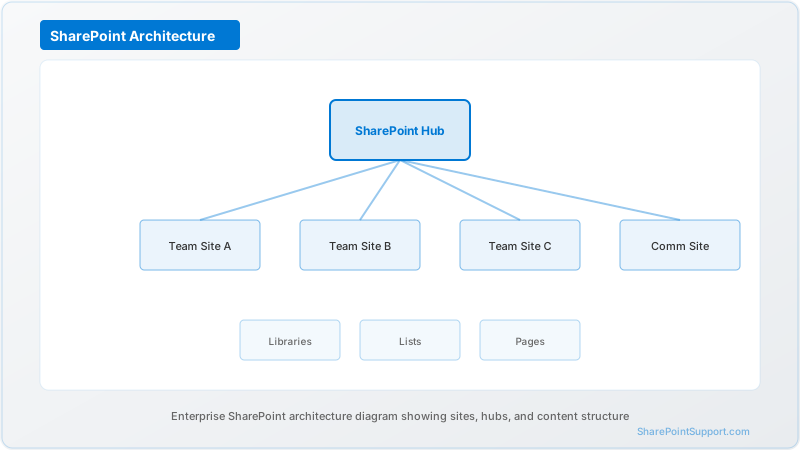
Hub sites provide four things a flat site collection topology doesn't:
- Shared navigation: the hub top nav propagates to every associated site
- Unified branding: theme, logo, and site header apply to associated sites
- Rolled-up search: search from the hub returns results from all associated sites in one scope
- News and activity rollups: the hub can surface news posts and activity from associated sites
Hubs do not replace site collection permissions, they do not create a permissions hierarchy, and they are not a substitute for information architecture. A hub without a designed information architecture is decoration on chaos.
Microsoft's planning hub sites documentation covers the technical model; the blueprints below cover how to apply it at organizational scale.
Blueprint 1: 500-user org (3-hub pattern)
For organizations under 1,000 users with a single geography, three hubs cover the practical space.
```
[Home / Intranet Hub]
|
--------------------+--------------------
| | |
[Corporate Hub] [Operations Hub] [Projects Hub]
| | |
HR, Legal, Sales, Support, Active project
Finance, Product, sites (10-40),
Executive, Customer archived project
Comms Success sites
```
Corporate hub
Contains: HR (policies, benefits, org chart), Legal (contracts, IP, compliance), Finance (invoicing, expense, budget), Executive Communications (leadership blog, all-hands materials).
Associated sites: 8 to 15. Owner: Head of Operations or Chief of Staff. Governance: quarterly review of site health, monthly review of external sharing.
Operations hub
Contains: Sales (playbooks, competitive intel, deal desk), Support (KB, runbooks, escalation), Product (roadmap, PRDs, spec repository), Customer Success (onboarding, health scores).
Associated sites: 10 to 20. Owner: VP Ops or COO. Governance: monthly business unit sync.
Projects hub
Contains: active client and internal project sites, archived project sites (moved to read-only after close).
Associated sites: 20 to 50 (rotating). Owner: PMO lead. Governance: project close checklist archives the site, updates the hub navigation.
Total site count
For 500 users at this pattern, expect 40 to 85 total sites, well under any SharePoint limit.
Blueprint 2: 5,000-user org (5-hub pattern)
At 5,000 users, add specialized hubs for HR and Regional. The Corporate hub gets narrower, and Operations splits by function.
```
[Home / Intranet Hub]
|
-------------------------+-------------------------
| | | | | |
[Corporate] [HR Hub] [Ops Hub] [Region Hub] [Projects] [Innovation]
| | | | | |
Executive Benefits Sales NA/EMEA/ Active Labs,
Comms, Policies, Support, APAC clients, R&D,
Legal, Learning, Product, regional Internal Emerging
Finance Talent Success comms projects tech
```
Corporate hub (narrower at this size)
Executive comms, legal, finance, board materials, strategic planning. Associated sites: 15 to 25.
HR hub (new at this size)
Benefits, learning management, talent development, DEI programs, org-wide policies, employee resource groups.
Associated sites: 20 to 40. Owner: CHRO. Critical because HR content has unique regulatory (HIPAA for benefits, GDPR for employee data) and lifecycle requirements.
Operations hub
Sales, support, product, customer success — same as Blueprint 1 but with more sub-sites per function.
Associated sites: 40 to 80.
Regional hub
Regional variations: North America, EMEA, APAC each get a landing site under the Regional hub. Manages timezone-specific comms, regional compliance requirements (GDPR for EMEA, PIPEDA for Canada), local benefits.
Associated sites: 3 to 12 (one per region). Owner: Regional VP.
Projects hub
Client-facing and internal projects. At 5K users, split into "Client Projects" (external-facing, external sharing enabled with governance) and "Internal Projects" (internal-only).
Associated sites: 80 to 200.
Innovation hub
R&D, labs, emerging technology exploration, patent tracking. Isolated from mainstream sites for IP protection.
Associated sites: 10 to 25.
Total site count
150 to 400 sites. Still well within limits but requires structured provisioning to prevent sprawl.
Blueprint 3: 50,000-user org (7-hub pattern with hub-of-hubs)
At 50,000 users, three things break: the 2000-site association limit becomes a real constraint, the navigation surface exceeds cognitive load for any single hub, and Line-of-Business workloads need their own governance.
```
[Master Home Hub]
|
------------------------+------------------------
| | | | | |
[Corporate] [HR] [Ops] [Region] [LOB] [Compliance]
| | | | | |
| Benefits Sales NA/EMEA/ Product Records,
| Learning Support APAC/ Line 1, e-discovery,
| Talent Product LATAM Product Retention,
| Success Line 2, Audit
| Line 3
|
[Sub-hub: [Sub-hub: [Sub-hub:
Exec] Legal] Finance]
```
The seven hubs
- Corporate hub — with three sub-hubs for Executive, Legal, Finance (each a promoted communication site)
- HR hub — full benefits, learning, talent, DEI
- Operations hub — sales, support, product, customer success
- Regional hub — NA, EMEA, APAC, LATAM (four regional landing sites)
- Line-of-Business hub — one landing per LOB, each with its own product hierarchy
- Compliance hub — records management, e-discovery, retention, audit
- Innovation hub — R&D, labs (as in Blueprint 2 but larger)
The 2000-site association limit
A hub can associate up to 2000 sites. At 50K users, several hubs will hit or approach this limit. The workaround is a hub-of-hubs strategy.
Hub-of-hubs strategy
Each of the seven top-level hubs becomes a "master hub" that associates 5 to 15 sub-hubs, each of which associates its own 100 to 500 sites. The master hub's associated sites are the sub-hubs themselves, not the leaf sites.
For example, the Operations master hub might associate:
- Sales sub-hub (associates 400 sales sites)
- Support sub-hub (associates 600 support sites)
- Product sub-hub (associates 300 product sites)
- Customer Success sub-hub (associates 500 customer success sites)
Total Operations landscape: 1,800 leaf sites, but the Operations master hub only counts 4 direct associations.
Search still works across the whole scope because sub-hub search settings can inherit from master. Navigation is designed at the master to show sub-hub landing pages plus curated highlights.
Microsoft's hub site multi-geo planning guidance covers a variant of this pattern for organizations with data residency requirements.
Total site count
3,500 to 8,000+ sites at 50K users, with hub-of-hubs keeping any single hub under 2,000 associations.
When to demote a hub
Hubs are not free. Each hub carries governance, ownership, and navigation overhead. Demote a hub back to a regular site when:
- Association count is under 5 for six consecutive months — the hub isn't earning its keep
- The owner has left and no successor emerges within 90 days — an unowned hub is a governance vacuum
- Two adjacent hubs consistently confuse users ("is this in Operations or in Regional?") — merge them
- Search rollup is duplicating results because sub-hubs overlap in scope — consolidate scopes
- The hub was created for a project that ended — projects should associate to the Projects hub, not become permanent hubs
Demoting a hub does not delete the site — it removes the hub designation and any associated sites need to be re-associated to a surviving hub.
Search and navigation propagation gotchas
Hubs have real behaviors around search and navigation that surprise people if they haven't been designed around.
Search rollup lag
When a document is added to an associated site, it takes 5 to 60 minutes to appear in hub-level search. For time-sensitive content (breaking news, urgent policy updates), post directly at the hub and cross-link to the associated site.
Navigation propagation is one-way
Hub navigation propagates to associated sites. Sites cannot push their own navigation up to the hub. This means the hub owner controls navigation for every associated site — a governance-heavy setting worth documenting.
Association is not permissions
Associating a site to a hub does not change site permissions. Users see the hub in the app launcher and search results, but if they don't have permission on the associated site, they get an access-denied when they click through. Design the hub navigation to point only to sites the target audience actually has permission on.
Theme override
Associated sites inherit the hub theme, but a site owner can override locally. For regulated sites where branding compliance matters, disable local theme changes.
Search scope
By default, hub-level search returns results only from associated sites. To include OneDrive files or M365 Group files that aren't in associated sites, configure the hub search settings explicitly.
Provisioning strategy
Blueprints only work if provisioning enforces them. At scale, a site request flow should:
- Ask the requester which hub the new site should associate to
- Validate the hub owner approves the association
- Provision the site with the correct sensitivity label and DLP settings for the hub
- Auto-associate to the hub during provisioning
- Register the site in the enterprise site inventory with hub metadata
Without this flow, sites get provisioned outside any hub, ending up in the "unassociated" bucket that no one owns and nothing surfaces.
Common architectural mistakes
- One hub per department — a 25-department org becomes 25 hubs, and users can't find anything. Group departments into functional hubs.
- Hubs for one-off projects — projects should associate to a Projects hub, not become their own hub
- Deep hub-of-hubs (three-plus levels) — associations only go one level, so a three-level hub-of-hubs breaks the rollup for the deepest sites
- Regional hub with too many countries — split by continent, not country, unless you have 10,000+ users per country
- No compliance hub — records management and legal hold sites need their own governance model and usually their own hub
- Not designing for M&A — an acquired company's SharePoint tenant needs a landing hub during coexistence, plan for it
Our SharePoint consulting service implements these blueprints as the starting architecture for new tenant deployments and re-architects legacy tenants that have sprawled beyond manageability. For active migration engagements, we use the target hub design to guide site collection consolidation. On the SharePoint intranet side, the Master Home Hub becomes the intranet homepage with tailored views for each audience.
Frequently asked hub architecture questions
Expert help from our SharePoint consultants
If your organization is planning a new SharePoint tenant, consolidating multiple tenants after M&A, or re-architecting a sprawled legacy tenant, our SharePoint consulting team will design a hub blueprint sized for your user count, regulatory profile, and growth trajectory. Start with our contact page to schedule an architecture workshop.
Written by the SharePoint Support Team
Senior SharePoint Consultants | 25+ Years Microsoft Ecosystem Experience
Our senior SharePoint consultants bring deep expertise spanning 500+ enterprise migrations and compliance implementations across HIPAA, SOC 2, and FedRAMP environments. We cover SharePoint Online, Microsoft 365, migrations, Copilot readiness, and large-scale governance.
Expert SharePoint Services
Frequently Asked Questions
What is the maximum number of sites a SharePoint hub can associate?▼
Can a SharePoint site be associated to more than one hub?▼
Do hub sites replace SharePoint site collections?▼
How do we handle hub sites across multiple geographies?▼
Should we create a hub for every department?▼
What happens to associated sites when we delete a hub?▼
How does hub site search compare to Microsoft Search across the tenant?▼
Need Expert Help?
Our SharePoint consultants are ready to help you implement these strategies in your organization.
Continue Reading in Architecture
SharePoint Online Limits in 2026: What Actually Breaks at Scale
Everyone can recite the 5,000-item threshold. Almost nobody can tell you what genuinely fails first in a large tenant — and in 2026 the answer changed, because agents and Copilot now query your lists too.
ArchitectureSharePoint Hub Sites: Building Connected Experiences
Design an effective hub site architecture that connects related sites, shares navigation, and creates a cohesive experience across your SharePoint environment.
ArchitectureSharePoint Site Collections: Best Practices
Understand SharePoint site collection architecture with best practices for planning, creating, and managing site collections in your Microsoft 365 environment.
ArchitectureSharePoint Information Architecture Guide
Design a scalable SharePoint information architecture with hub sites, metadata taxonomy, navigation patterns, and governance frameworks that serve enterprise organizations for years.
ArchitectureSharePoint Hub Sites: Architecture Guide for 2026
Design and implement SharePoint hub sites that unify navigation, branding, search, and governance across your enterprise. Covers hub planning, association strategies, and real-world architecture patterns.
ArchitectureSharePoint Hub Sites at Scale: 500+ Sites
Hub sites work beautifully for 20 sites and collapse at 500. A proven architecture, governance, and automation model for large enterprises in 2026.